Vodafone PPPoE CityFibre
What
If you have no intentions to use the locked down, cheap Vodafone router that they supply you, you will need to have the PPPoE credentials in order to use a third party router.
If you are unsure what PPPoE is, please refer to the Wikipedia page on PPPoE ⧉
Some notes
As far as I can tell, this guide will only work on CityFibre, due to the VLAN. However the rest of the guide remains true
Getting your PPPoE credentials
You will need to contact customer service.
Be firm but polite around needing the credentials. They will give you the usual garbage about how uSINg A thiRD parTy RouTEr May ADd isSuES aND InSTability WE MaY NOt be ABle to troubLEsHoOT iSsUEs - and to that I say... Poo you!
You can use the below
Hello Support. Please provide me with the PPPoE username and password for my connection.

I need this copy and pasted in to the chat, as some characters (like 0 and o) look similar.

If possible please can you text this to me
PPPoE details
Regardless of your router, you will require the below details
| Field name | Value |
|---|---|
VLAN ID |
911 |
| Username | dsl#########@broadband.vodafone.co.uk |
| Password | What ever Vodafone gave you |
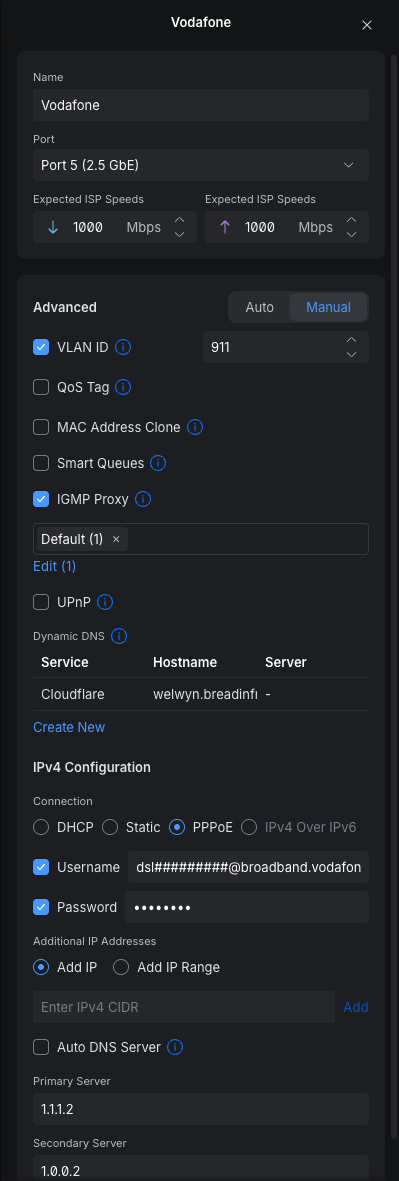
Add Vodafone to Unifi
Navigate to Settings > Internet
Click on the interface that has your cable plugged in to.
Give it a name, for example Vodafone
Under the Advanced field, click Manual
Set the below:
VLAN IDset it to911- IGMP Proxy
Default - IPv4 Configuration
PPPoE - Username:
dsl#########@broadband.vodafone.co.uk - Password: What vodafone provided
An example config is below: